

Request exists and is pending
Keep the original request ID and time. Ask which approval, account check or payment step remains, and whether anything is required from you. M-Pesa cannot explain an operator queue from a betting-account number alone.
Kenya · M-Pesa cashouts
Find the withdrawal in your betting account before opening a payment complaint. Save its request number, amount in KES, selected method and latest status. Pending needs an operator decision; reversed needs an explanation; sent needs a transfer reference you can match to M-Pesa.
If M-Pesa disappeared from the menu before you submitted anything, there is no pending transfer to trace. Ask about the missing cashout method first.
Keep the original request ID and time. Ask which approval, account check or payment step remains, and whether anything is required from you. M-Pesa cannot explain an operator queue from a betting-account number alone.
Save the reason and the balance before and after the change. Ask whether the amount returned to the betting balance and which method is available for a new request. A reversal has not put money into your M-Pesa wallet.
Ask for the M-Pesa transaction reference, sending time and amount. Confirm the recipient number privately. Now check the recipient record and ask the sender to investigate any mismatch.
Capture the withdrawal menu or error. Ask how the existing balance can be withdrawn and what recipient requirements apply. Use the payment-method guide if support asks you to switch routes.
Handle a missing or mismatched payment method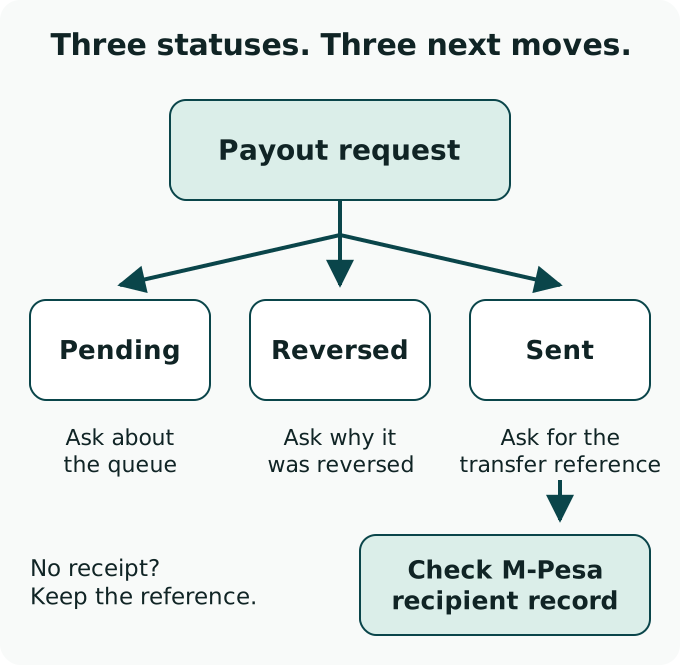
An unchanged wallet balance does not identify which transaction is missing. Open your M-Pesa transaction history or obtain a full statement covering the claimed sending date. Safaricom's statement service separates money in from money out; find the incoming entry and compare the amount, date and transaction reference.
Safaricom's published full-statement route is *234#, then My M-PESA Information, M-PESA Statement and Full Statement. Follow its registration prompts privately, including the email address where you want the statement delivered.
Keep the confirmation SMS if you received one, but use the statement to establish whether a credit appears. Safaricom notes that app statement information can lag. If an app view and another transaction record disagree, ask Safaricom to confirm the particular entry, giving the reference and date.
Compare the number selected for the withdrawal with the number on your M-Pesa account. Give the complete number only to the authenticated support team that needs to check it. A missing SMS, a wrong recipient and a returned transfer are different findings; record the one you can actually establish.
| Record | What it establishes | Next useful question |
|---|---|---|
| Betting withdrawal ID | A cashout request exists in the operator's system | What is the current request state, and what remains before sending? |
| M-Pesa receipt or transaction reference | The sender identifies a particular payment | What recipient, amount and final payment status belong to this reference? |
| Incoming entry on your M-Pesa statement | A credit is recorded on the recipient side | Does it match this cashout's amount and reference? |
| Reversal entry in the betting account | The operator recorded a reversal | Where is the returned amount now, and why was the payment reversed? |
A betting request number does not replace the M-Pesa transaction reference. Keep both in the same support conversation.
Ask the operator for a payment receipt or provider reference, plus the recipient number, amount and sending date. A cropped Paid label leaves those details unanswered. If the operator used a payment processor, ask it to identify who sent the transfer and obtain the processor's result.
Safaricom's business transaction-status service can use an M-Pesa receipt number or the sender's conversation reference. The sending business or its processor handles that query. Ask it to confirm whether its payment succeeded, failed or was returned, and to attach the result to your existing withdrawal case.
If the sender confirms success but your statement has no matching incoming entry, take the payment reference and date to Safaricom support. If the recipient number differs, send that discrepancy back to the operator. Neither situation is fixed by creating another cashout before the first transfer is explained.
In a Betika discussion, a commenter said support traced a missing M-Pesa payout and reversed the amount into the betting balance. The commenter later reported that a second withdrawal succeeded. Those were two steps, with a new cashout after the reversal.
The original poster in that discussion described a different problem involving a missing balance and disputed Aviator wagers. The commenter's payment outcome does not resolve that allegation. It also gives no general M-Pesa waiting period or guarantee that repeating a withdrawal will work.
A separate 22Bet player report began with M-Pesa disappearing as a withdrawal choice. No successful payment was confirmed there. Treat a missing method as a route problem; an extra deposit does not tell you where an existing cashout went.
Give the original withdrawal ID, amount, method and request date, followed by the exact latest status.
Pending: what is outstanding? Reversed: why, and where is the amount? Sent: what payment reference and recipient were used?
Use the cashier state and, for a claimed send, a statement extract covering the payment date. Leave unrelated transactions out of a public complaint.
Mask personal numbers and balances in public screenshots. Never provide an M-Pesa PIN, login password or one-time code to a person tracing a payment.
Follow a claimed send with the actual payment record.
Use this when the problem starts before a cashout is submitted.
Keep claims, responses and receipt evidence distinct.